|
Navigation: Writing Help Topics > Dynamic Styles > Dynamic Styles: Overview |
Send comments on this topic.
|
|
Navigation: Writing Help Topics > Dynamic Styles > Dynamic Styles: Overview |
Send comments on this topic.
|
Dynamic styles is a tool which significantly simplifies the process of working with font, paragraph, and list settings. A single style, depending on its type, stores different formatting attributes such as font name, font size, color, paragraph alignment, settings of bulleted or numbered list, etc.
Using the dynamic styles functionality in your help project, you can:
•Setup and re-use formatting settings for other content of your help project.
•Quickly change the formatting of content by editing the associated styles.
•Setup an alternative view of a single style in a specific output help format.
The HelpSmith's built-in word processor is completely based on dynamic styles, which means that it always uses dynamic styles to store the formatting attributes even when you change font, paragraph, or list settings directly in the editor.
The Styles pane displays the styles of the current help project. To show it, on the View tab, in the Tool Panels & Toolbars group, click Styles.
Depending on the program options, the Styles pane can display or hide particular types of styles.
Using the toolbar at the top of the Styles pane, you can add a new style, modify an existing style, delete a style, and apply a style to the content which is selected in the word processor.
1.On the View tab, in the Tool Panels & Toolbars group, click Styles.
2.On the toolbar at the top of the Styles pane, click New Style.
3.In the Style dialog, enter a style name, select a style type, define a base style, and setup the formatting settings.
4.Click OK.
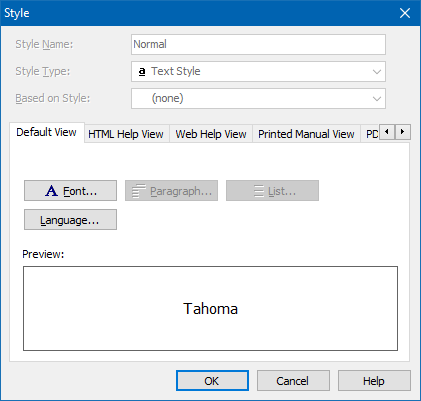
The Style dialog
1.On the View tab, in the Tool Panels & Toolbars group, click Styles.
2.In the Styles pane, click the style that you want to modify.
3.On the toolbar at the top of the Styles pane, click Modify.
4.In the Style dialog, change the settings you want.
5.Click OK.
1.On the View tab, in the Tool Panels & Toolbars group, click Styles.
2.In the Styles pane, click the style that you want to delete.
3.On the toolbar at the top of the Styles pane, click Delete Style.
1.On the View tab, in the Tool Panels & Toolbars group, click Styles.
2.In the word processor, select content that you want to associate with a style.
3.In the Styles pane, click the style you want to apply.
4.On the toolbar at the top of the Styles pane, click Apply Style.
HelpSmith allows you to find content (text, paragraphs, lists, etc.) which uses a specific style in the topics and templates.
1.On the View tab, in the Tool Panels & Toolbars group, click Styles.
2.In the Styles pane, right-click on the style that you want to find in the topics and templates, and then click Find in Topics.
3.In the Find and Replace window, on the Go To tab, use the Next button to find the next object which uses the selected style.
HelpSmith allows you to find content (text, paragraphs, lists, etc.) which uses a specific style, and link it with another style:
1.On the View tab, in the Tool Panels & Toolbars group, click Styles.
2.In the Styles pane, right-click on the style that you want to replace, and then click Replace Style.
3.In the Replace Style dialog, specify the style by which you want to replace the first style.
4.Specify where you want to find and replace the style: current topic (or template) only, all topics and templates.
5.Click Replace Style.
Copyright © 2007-2024 HelpSmith.com


