|
Navigation: Getting Started > Help Topics > Topic Properties |
Send comments on this topic.
|
|
Navigation: Getting Started > Help Topics > Topic Properties |
Send comments on this topic.
|
1.In the Project Manager pane, click the TOC item you want to edit.
2.On the Project tab, in the Topics & Templates group, click Properties.
3.In the dialog, modify the properties you want.
4.Click OK.
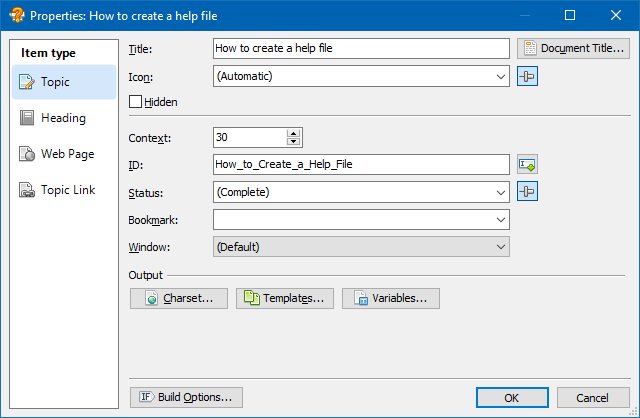
Editing properties of a TOC item
Below is a description of TOC item properties. Please note that some of the parameters below are available for a specific item type only.
The main title of the help topic (or other TOC item).
Allows you to define an alternative title that will be used as the value of the HTML <title></title> tag when exporting the topic into the HTML format.
By default, the main title is used.
The icon associated with the TOC item.
If selected, the item will not be shown in the Table of Contents in the compiled help system. However, a hidden topic can still be accessed through a hyperlink, from the Index, search results, etc.
Numeric identifier used to associate a specific topic with a unique integer value.
The Context Id is used for linking purposes within a help system and also when integrating a help system with an application using HTML Help API.
Textual topic identifier which is used for similar purposes as the Context Id.
The status associated with the topic, which you can use for your convenience while working on a help project.
By default, any topic has the "Complete" status, but you can also use your own custom statuses.
A bookmark located in the linked topic.
When clicking an item which links to a bookmark, the help system will open the linked topic and will automatically scroll to the bookmark location.
The help window in which the topic should be displayed in HTML Help. You can add and edit help windows used in the HTML Help system.
Allows you to set an alternative character set used when exporting the help topic into the HTML format.
By default, the charset value defined in the Project Options is used.
Allows you to set an alternative template or disable using a template by the topic in a specific output format.
By default, topics use templates defined in the Project Options for specific output formats.
Allows you to define or override text variables for this topic.
The URL address of the linked webpage or document. For example, you can use this parameter to link to your website, or to an external document (for example, a PDF document) that is located on your web server.
Specifies where the linked webpage or document will be opened when clicking on the TOC item:
•Page Default (None) - the linked webpage or document will be opened in the same frame that displays the current topic.
•New Page - The linked webpage or document will be opened in a new tab or window in the web browser.
•Whole Page - The linked webpage or document will opened in the same tab or window that displays the entire help system.
Remark: The Target Frame parameter for a TOC Item is supported in the Web Help format only.
Allows you to set build options that determine when the item should be included or excluded to/from the output help system.
Copyright © 2007-2024 HelpSmith.com


